

















A Telegram crypto wallet is a built-in digital tool for storing, sending, and receiving cryptocurrency directly inside the Telegram messenger. Through @wallet bot, TON Wallet, or Tonkeeper, you can manage TON, Bitcoin, USDT, and other assets — no external apps required, setup takes under 5 minutes.
Between $150 and $250 billion in cryptocurrency is permanently lost. Not stolen — lost. Forgotten passwords, trashed hard drives, seed phrases scribbled on a napkin that went through the washing machine. According to Chainalysis, roughly 20% of all Bitcoin (~3.79 million BTC) will never move again — their owners lost access to their wallets.
This guide exists so you don't join that statistic.
I wrote it for people who want to get their wallet right on the first try. Not "set it up and figure it out later," but actually understand what you're doing — why @wallet and Tonkeeper serve different purposes, what a seed phrase really protects, and why KYC verification is there for your benefit, not just bureaucracy.
Disclaimer: this guide is for educational purposes only and does not constitute financial advice. Cryptocurrencies are high-risk assets. Only invest funds you can afford to lose.
What Is a Telegram Crypto Wallet
A crypto wallet is software that stores your private keys and lets you manage cryptocurrency. The coins themselves don't live "inside" the wallet — they exist on the blockchain. The wallet is just a set of keys that unlocks access to your funds.
Think of it like a safe deposit box at a bank. Your money (crypto) sits in the vault (blockchain). You hold the key (private key). Lose the key, and the money stays put — but you can never reach it again. Unlike a real bank, there's no manager to call. No Telegram support rep will open it for you. No "recovery service" from your DMs will help (those are scams, by the way — learn to identify crypto scams on Telegram).
With over 1 billion monthly active users (DemandSage, 2026), Telegram has become a natural home for crypto. More than 100 million users have already activated a crypto wallet in the messenger (BingX, 2026). Here's what makes a Telegram wallet practical:
- Instant transfers to contacts — no bank details, no fees, no waiting
- Buy TON, USDT, and Bitcoin via P2P exchange without leaving the app
- Access 250+ dApps in the TON ecosystem — staking, NFTs, DeFi
- Cross-chain deposits from 7 networks including Ethereum, Solana, and BSC (new in February 2026)
- Earn passive income — Yield Vaults with up to 18% APY
New to cryptocurrency? Start with our complete crypto guide for beginners. This article focuses specifically on wallet setup.
Three Wallet Types: Custodial vs Non-Custodial vs External
Before you touch any "Create Wallet" button, you need to understand what you're choosing. Telegram's ecosystem offers three distinct wallet types, and picking the wrong one for your needs can cost you money — or control.
@wallet — Custodial (Like a Bank Account)
@wallet is Telegram's built-in bot. It's custodial, meaning Telegram holds your private keys on their servers. You don't manage them. 25 million active accounts (BingX, 2026) show that plenty of people are comfortable with this trade-off.
For beginners, @wallet is the fastest start. No seed phrase to worry about, no private key management, no backup headaches. But you're trusting Telegram with your funds. If your account gets banned or @wallet service goes down — your access goes with it.
TON Wallet (Formerly TON Space) — Non-Custodial Inside Telegram
In July 2025, TON Space was rebranded to TON Wallet (wallet.tg). If you're reading guides that still mention "TON Space" — they're outdated. TON Wallet is a non-custodial wallet that runs as a mini-app inside Telegram. You get a 24-word seed phrase and full control over your keys.
The July 2025 launch in the US, reaching 87 million users (CoinDesk), signals serious regulatory compliance. This isn't a toy — it passed real scrutiny.
Tonkeeper — External Non-Custodial Wallet
Tonkeeper is a standalone app for iOS and Android. Over 10 million users, 42 million total downloads (AppBrain, 2025). It's the most feature-rich TON wallet: built-in dApp browser, staking, NFT support, and full DeFi access.
If you're planning to seriously engage with the TON blockchain ecosystem, Tonkeeper gives you maximum control and functionality.
Comparison Table: Which Wallet Is Right for You
| Feature | @wallet | TON Wallet (ex-TON Space) | Tonkeeper |
|---|---|---|---|
| Type | Custodial | Non-custodial | Non-custodial |
| Where it lives | Telegram bot | Telegram mini-app | Standalone app |
| Who holds keys | Telegram | You | You |
| Seed phrase | Not needed | 24 words | 24 words |
| KYC required | Yes, for most operations | No | No |
| Cross-chain deposits | Yes (7 networks, Feb 2026) | No | Limited |
| Yield Vaults | Yes (up to 18% APY) | No | Via DeFi |
| P2P marketplace | Yes | No | No |
| DeFi / dApps | Limited | 250+ apps | Full access |
| Best for | Beginners, daily use | Intermediate users | Power users |
My recommendation: start with @wallet. Put your first $50 in TON. Learn the interface. After a week or two, set up TON Wallet or Tonkeeper for larger amounts. Keeping everything in one place is poor practice in crypto.
Setting Up @wallet Bot: Step-by-Step
The whole process takes 5-10 minutes. Here's every step.
Step 1: Find and Launch the Bot
- Open Telegram and tap the search icon
- Type @wallet in the search bar
- Select the official Wallet bot — it must have a blue verification badge
- Tap Start
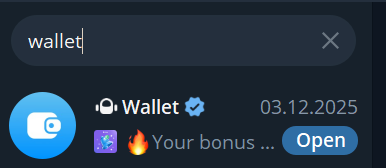
Scammers create dozens of fake bots with similar names: @walllet, @wa1let, @wallet_official. The real bot is @wallet with a blue checkmark. Nothing else.
Step 2: Complete KYC Verification
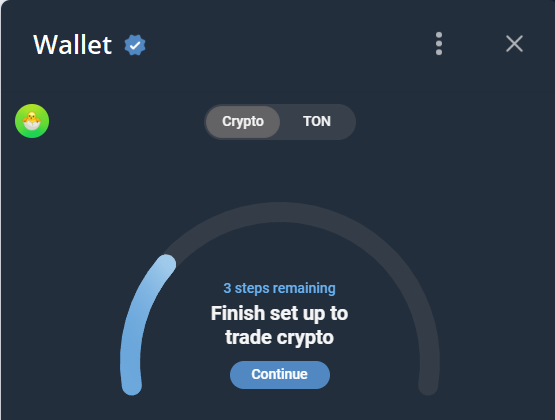
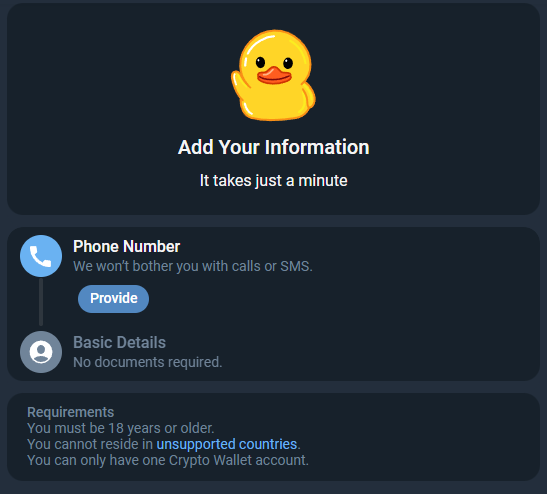
@wallet uses a tiered KYC system. Here's what each level unlocks:
| Level | Requirements | Limits | Processing |
|---|---|---|---|
| No KYC | Nothing | Receive crypto and withdraw only | — |
| Basic | Name, phone, date of birth (NO documents) | 3,500 EUR/day, 35,000 EUR/month | 5-15 min |
| Extended | + National ID document | 100,000 EUR/day, 1,000,000 EUR/month | Up to 24h |
| Advanced | + Proof of address | Unlimited | Up to 48h |
KYC provider: WOT Global Solution, a subsidiary of The Open Platform (since May 30, 2024, per CoinTelegraph). Limits are current as of March 2026 and may change — check the bot's settings for the latest values.
For your first purchase of $20-50, Basic level is enough. No document uploads — just your name and date of birth. The 3,500 EUR daily limit covers any beginner's needs.
Step 3: Fund Your Wallet
After KYC approval, you have several options:
- P2P purchase — buy crypto from another user, pay via bank transfer, card, or payment app
- Bank card — available in select regions via MoonPay
- Crypto transfer — send TON, USDT, or BTC from another wallet
- Cross-chain deposit — send from Ethereum, Solana, BSC, and more (details below)
For a P2P purchase:
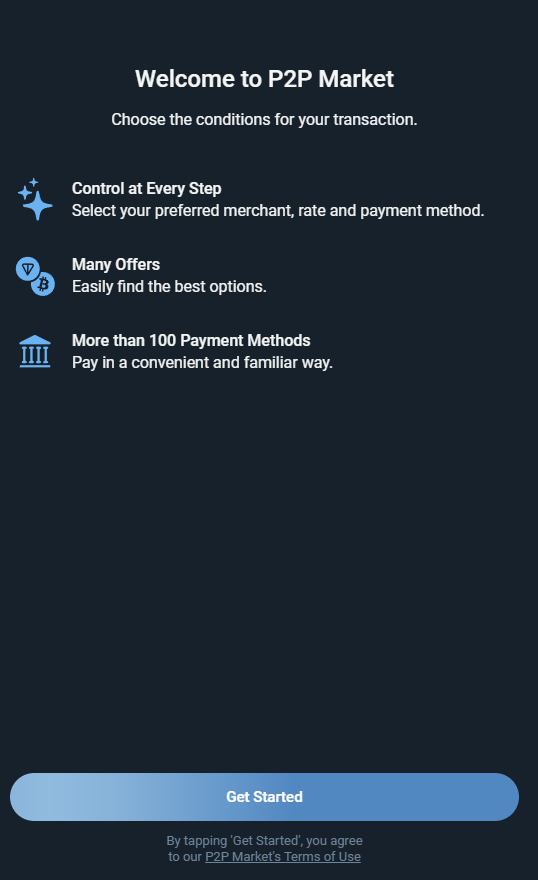
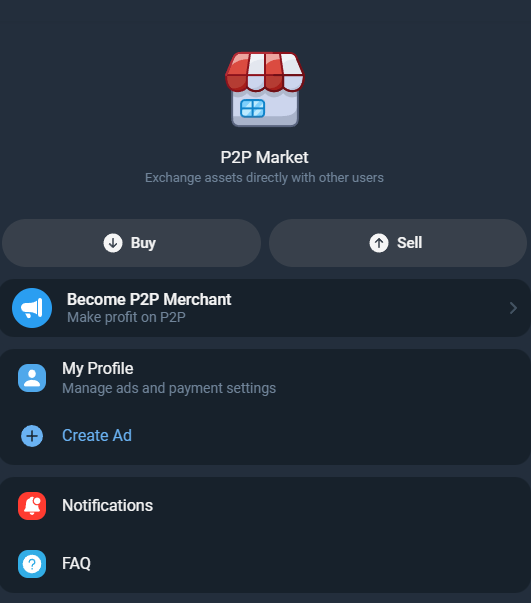
- Tap P2P Market in the bot menu
- Choose a currency (TON, USDT, BTC)
- Enter your amount and payment currency
- Select a seller — look for 98%+ rating and 100+ completed trades
- Follow payment instructions
- Mark as paid and wait for seller confirmation
Step 4: Explore the Interface
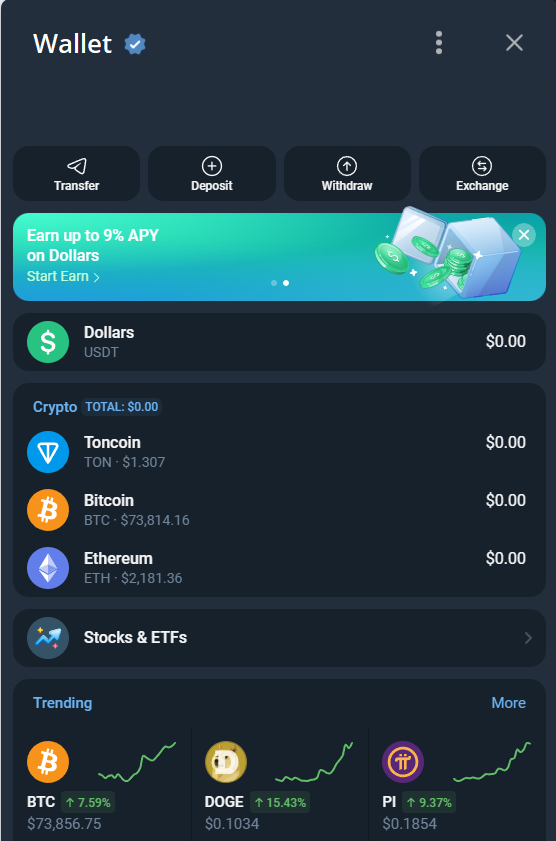
Your main @wallet screen shows:
- Balance — total holdings across all cryptocurrencies
- Send — transfer crypto to a user or external address
- Receive — your deposit address and QR code
- Exchange — swap between cryptocurrencies
- P2P Market — buy/sell for fiat
- Earn — Yield Vaults for passive income (new in 2026)
Setting Up TON Wallet and Tonkeeper
Once you're comfortable with @wallet, here's how to set up non-custodial alternatives for larger amounts.
TON Wallet: Non-Custodial Inside Telegram
- Open @wallet bot
- Navigate to the TON Wallet section
- Tap Create Wallet
- The bot generates a 24-word seed phrase — write it on paper immediately
- Confirm the phrase by selecting words in order
- Set a PIN or enable biometrics
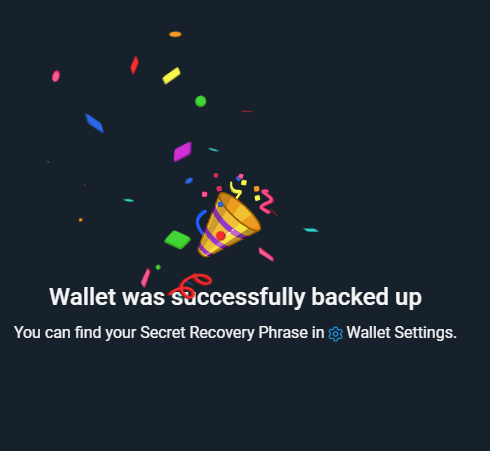
Here's the uncomfortable truth: most people skip the seed phrase backup. "I'll do it later." You won't. Write those 24 words on paper right now, before you do anything else. That piece of paper is your only way back if your phone breaks, gets stolen, or takes a swim.
Tonkeeper: Installation and Setup
- Download Tonkeeper from the App Store or Google Play
- Tap Create New Wallet
- Write down the 24-word seed phrase on paper
- Confirm the phrase
- Set up PIN or biometric authentication
- Done — your address is active
Connect Tonkeeper to Telegram via TON Connect for seamless dApp access.
Cross-Chain Deposits: Fund Your Wallet from Any Network (2026)
In February 2026, @wallet launched cross-chain deposits via MoonPay (Chainwire, Daily Hodl, Decrypt). This changes everything. Previously, funding your Telegram wallet meant buying TON directly or using P2P. Now you can deposit from any major network.
Supported networks:
- Ethereum
- Solana
- TRON
- BSC (BNB Chain)
- Polygon
- Arbitrum
- Base
How it works:
- BTC, ETH, SOL → automatically converted to Toncoin
- USDC/USDT from any supported network → converted to USDT (TON) at 1:1 rate
- Withdrawals to other networks have been announced but aren't live yet
In practice: if you already have crypto in MetaMask, Phantom, or Trust Wallet, you can move it to Telegram without a centralized exchange as intermediary. Send ETH from MetaMask, receive TON in @wallet. Done.
Most competing guides in search results haven't been updated with this — they still say "fund via P2P only."
Yield Vaults: Earn Up to 18% APY in Your Wallet
Another February 2026 addition — the Earn section in @wallet. Yield Vaults let you earn passive returns on your crypto without active management.
Available vaults (Coinpedia, TronWeekly, February 2026):
| Asset | Yield | Provider |
|---|---|---|
| USDT | Up to 18% APY | Morpho, TAC |
| BTC | Variable | Re7 |
| ETH | Variable | Morpho |
How to activate:
- Open @wallet bot
- Go to the Earn section
- Select an asset and vault
- Enter the amount to deposit
- Confirm — returns start accruing automatically
DeFi providers Morpho, TAC (TON Applications Chain), and Re7 are established protocols, but understand this clearly: yields are not guaranteed and can change at any time. 18% APY on USDT is attractive, but this is DeFi — there's no deposit insurance. Only commit funds you're prepared to have locked up indefinitely.
None of the top-10 search results for "telegram crypto wallet setup" cover Yield Vaults yet.
Wallet Security Essentials
$150-250 billion in crypto is permanently lost (Chainalysis). About 20% of all Bitcoin — 3.79 million coins — will never move again. Losses from fake "recovery services" hit $1.9 billion in 2024 alone (Chainalysis Crypto Crime Report). Security isn't paranoia — it's math.
Seed Phrase: Your Master Key
A seed phrase is a set of 12 or 24 words generated when you create a non-custodial wallet. It's your only recovery method.
Seed phrase security checklist:
- Written on paper (NOT in phone notes, NOT in cloud storage, NOT as a screenshot)
- Stored securely: safe, bank deposit box
- 2-3 copies in separate locations
- Never sent via email, messenger, or SMS
- Never shared with anyone — not even "support" or "developers"
Two-Factor Authentication (2FA)
Your @wallet is tied to your Telegram account. Compromise the account, compromise the wallet. Enable two-step verification:
- Open Settings > Privacy and Security
- Tap Two-Step Verification
- Set a strong password
- Add a recovery email
Takes one minute. Could save you thousands.
5 Things You Should NEVER Do
- Enter your seed phrase on any website — 100% phishing. No legitimate service asks for your seed phrase via a web form
- Install wallets from links in group chats — only download from official app stores
- Connect your wallet to unknown dApps — a malicious smart contract can drain your funds in one transaction
- Keep all funds in one wallet — split between @wallet (daily spending), TON Wallet (medium amounts), and Tonkeeper (primary storage)
- Send crypto "for verification" or "to double it" — this scam is as old as crypto itself
Wallet news channels


Your First Transaction: Sending and Receiving Crypto
Wallet secured. Now let's put it to work with a small test — $1-5 is plenty.
Receiving Crypto
Via @wallet:
- Open the bot, tap Receive
- Select a cryptocurrency (TON, USDT, BTC)
- Copy the address or show QR code to the sender
- Wait for confirmation — TON transactions take 3-5 seconds
In Tonkeeper:
- Tap Receive on the main screen
- Share address or QR code
Critical: always verify the network. TON goes on TON network. USDT exists on multiple networks (TON, Ethereum, TRON). Wrong network = permanent loss. This isn't theoretical — it's one of the most common ways beginners lose money.
Sending Crypto
Via @wallet:
- Tap Send
- Choose the cryptocurrency
- Enter the recipient's address or select a Telegram contact
- Enter the amount
- Double-check address, amount, and network — then confirm
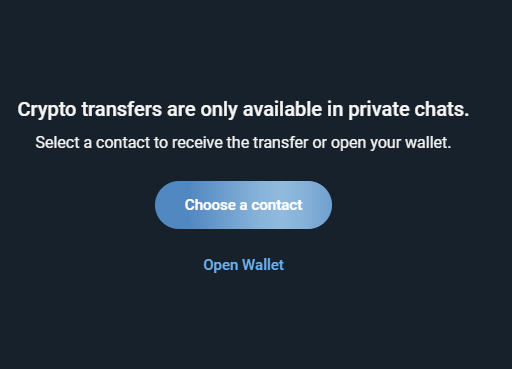
First transaction rule: always send the minimum amount first. Confirm it arrived. Then send the rest. Yes, you'll pay the fee twice — but TON fees are fractions of a cent, while a mistake could cost you hundreds.
In-Chat Telegram Transfers
The killer feature of @wallet — instant transfers between Telegram users with zero friction:
- Open a chat with the recipient
- Tap the attachment icon (paperclip)
- Select Wallet
- Enter amount and confirm
No addresses, no network selection, no fees. Faster than Venmo.
Ready to buy your first cryptocurrency on Telegram? Our next guide covers purchasing TON, BTC, and USDT with real fees and step-by-step screenshots.
Common Beginner Mistakes to Avoid
Every one of these costs real money. I see them constantly.
1. Skipping the Seed Phrase Backup
The single most expensive mistake in crypto. People create a wallet, skip the backup, change phones six months later, and discover their $500 is gone forever.
Fix: write down your seed phrase the moment you create the wallet. Not in 5 minutes. Now.
2. Sending to the Wrong Network
USDT exists on Ethereum, TRON, TON, BSC, and more. Send USDT from Ethereum to a TON address and the funds are gone. The blockchain doesn't have an "undo" button.
Fix: verify the network before every single send. If in doubt, ask the recipient.
3. Trusting Fake "Support"
Scammers DM you pretending to be @wallet or Tonkeeper support. They ask for your seed phrase, offer to "help recover funds," or send you to phishing sites.
Fix: real support never DMs first. Real support never asks for your seed phrase. Full stop.
4. Keeping Everything in One Wallet
One compromise and everything is gone. This isn't overthinking — it's basic risk management.
Fix: @wallet for daily spending. TON Wallet or Tonkeeper for savings. Hardware wallet (Ledger, Trezor) for serious holdings.
5. Ignoring Network Fees
Ethereum gas fees can hit $5-50 per transaction. TON fees are fractions of a cent. Sending $10 with a $5 fee means you just paid 50% overhead.
Fix: use TON for small transfers. Current real-world TON throughput: ~16 TPS with a recorded maximum of 1,542 TPS (Chainspect). Fees stay low even under load.
FAQ: Telegram Crypto Wallet Questions
Is it safe to store crypto in Telegram's @wallet?
For everyday amounts, yes. @wallet is custodial and protected by Telegram's security infrastructure. For larger sums, use a non-custodial wallet (TON Wallet, Tonkeeper) where you control the private keys. Think of @wallet as a spending wallet and non-custodial options as savings.
What if I lose access to my Telegram account?
For @wallet: recover your Telegram account via SIM card or recovery email. For TON Wallet or Tonkeeper: import your seed phrase into any compatible wallet app. Without the seed phrase, a non-custodial wallet cannot be recovered — this is a fundamental property of blockchain.
How do I withdraw crypto from Telegram?
In @wallet: Send → enter an external wallet address → specify amount → confirm. Funds arrive within minutes. You can also sell for fiat via the P2P market.
Can I use @wallet without verification?
Receiving crypto and withdrawing funds work without KYC. For buying, selling, and P2P exchange, you need at least Basic level (name + date of birth, no documents). Basic limit: 3,500 EUR/day.
Which wallet is best for large amounts?
Tonkeeper or TON Wallet — non-custodial with full key control. For maximum security, pair a hardware wallet (Ledger) with Tonkeeper. Storing large amounts in custodial @wallet is not recommended.
Do I need to pay taxes on cryptocurrency?
Tax obligations vary by jurisdiction. Many countries now have specific rules for digital assets, and regulations continue evolving in 2026. Consult a tax professional familiar with crypto legislation in your jurisdiction before making significant transactions.
Telegram Channels About Wallets and Crypto
Wallet set up — now stay informed. Our catalog includes 365 wallet channels and 73,224 crypto channels total. Top channels by subscribers:
| Channel | Subscribers | Focus |
|---|---|---|
| Tonkeeper News | 6.8M | Tonkeeper wallet updates |
| Bitget Wallet | 6.3M | Multi-chain Bitget wallet news |
| OKX Wallet | 5M | OKX wallet announcements |
| Wallet News | 4.5M | @wallet bot updates |
| Tronkeeper Wallet | 4.1M | TRON network wallet |
Browse the full catalog:
- Wallet channels — 365 channels
- All crypto channels — 73,224 channels
Facts verified: March 2026. TON price at publication: $1.20-$1.26 (CoinGecko). TON market cap: ~$2.94B (MetaMask). User counts and feature availability for @wallet, TON Wallet, and Tonkeeper are current as of publication date and may change.